Authentication: Why it matters in Algo Trading
Authentication is the foundation of every algorithmic trading system. No matter how advanced your strategy is, it cannot operate independently unless it can authenticate itself reliably and securely.
Most brokers still require:
- Manual OTP entry
- Phone-based approvals
- Browser redirects
- Human intervention at market open
This breaks true automation.
For an algo to be genuinely autonomous — capable of running on a server, restarting safely, or recovering from downtime — its authentication flow must be scriptable, predictable, and free from manual steps.
Authentication Flow
Traditional Broker Authentication
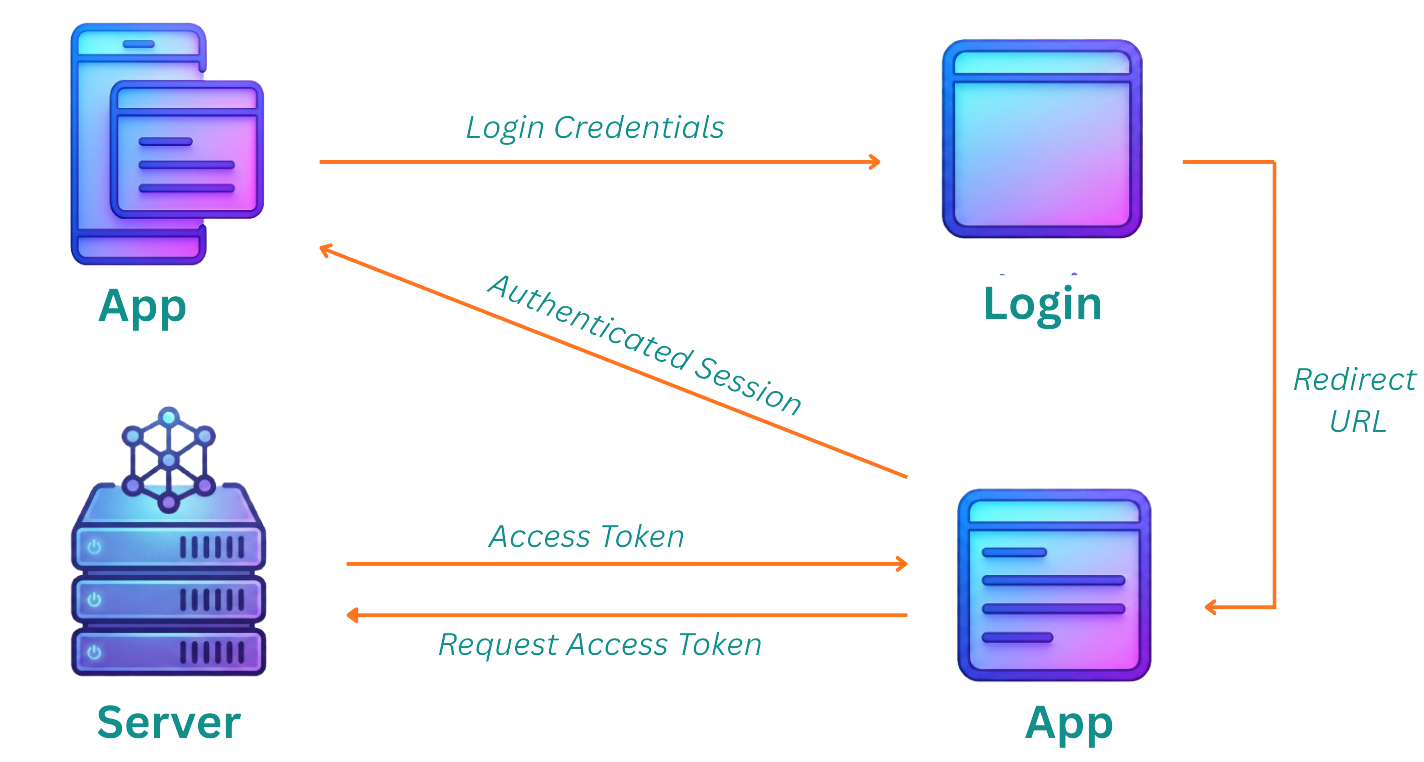
- Multiple redirect steps and browser-based login
- Captcha and manual approvals add friction
- Not suitable for automated or server-based execution
Nubra Authentication
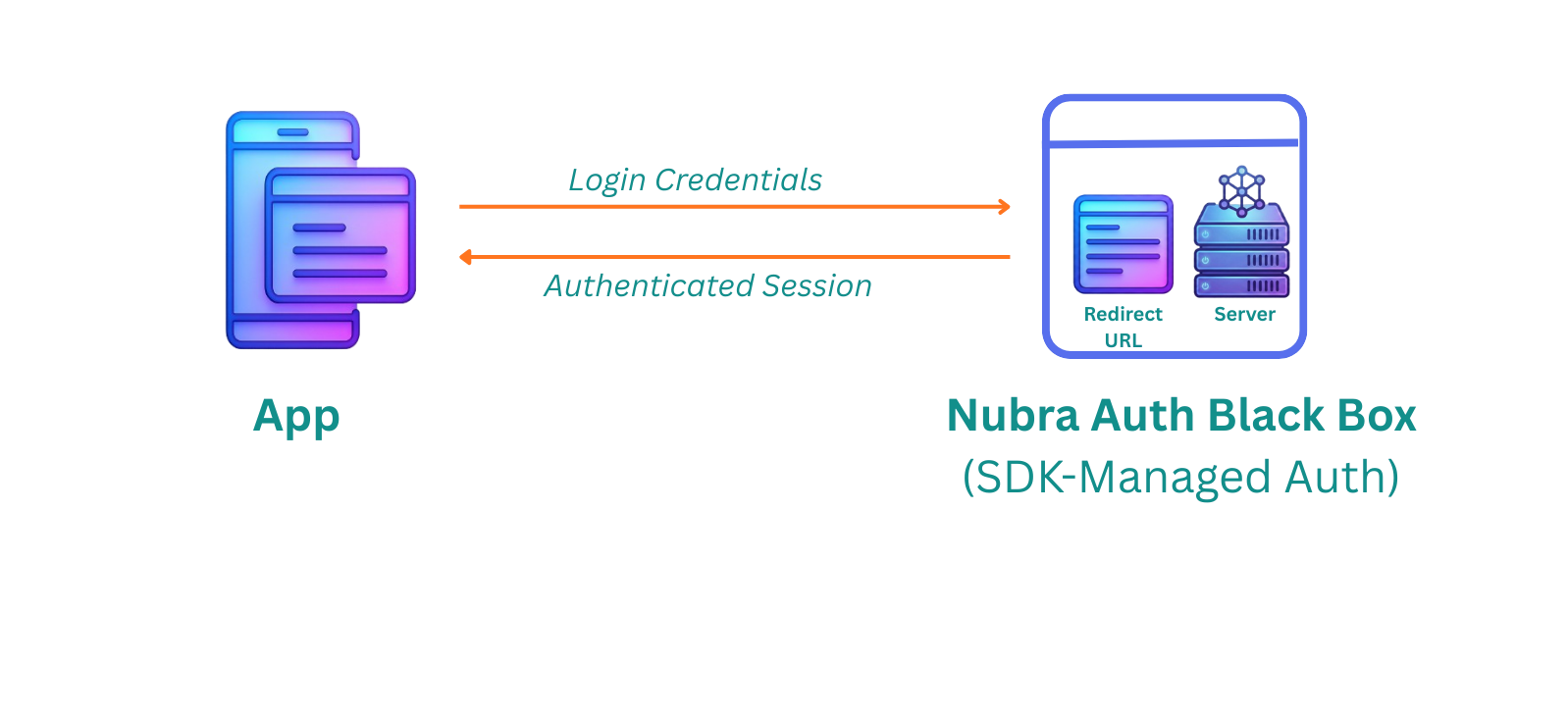
- Single streamlined flow managed by the Nubra SDK
- Works reliably across servers, cloud, CI/CD, and headless environments
- Designed for full automation and robust algo-trading setups
Nubra Authentication

Below are all the ways you can authenticate using the Python SDK — ordered from complete automation to semi-automation:
1. Full Automation with TOTP +
pyotp2. Semi-Automation Using Authenticator Apps
3. Phone OTP + MPIN (Default Method)
Authentication Modes
 1) Full Automation with TOTP +
 pyotp
Automate your entire authentication flow using a TOTP-based method.
Libraries such as pyotp generate time-based one-time passwords programmatically using your shared secret.
Once configured, this approach delivers 100% hands-free authentication — ideal for production servers, CI/CD pipelines, and fully autonomous trading systems.
Example
from nubra_python_sdk.start_sdk import InitNubraSdk, NubraEnv
import pyotp, builtins, getpass

# --- Your TOTP Secret ---
secret = "YOUR_TOTP_SECRET"
totp_gen = pyotp.TOTP(secret)

# Save originals so they can be restored later if needed
orig_input = builtins.input
orig_getpass = getpass.getpass

# Patch input() and getpass() so Nubra receives fresh TOTP automatically
def auto_totp_input(prompt=""):
    return totp_gen.now()

def auto_totp_getpass(prompt=""):
    return totp_gen.now()

builtins.input = auto_totp_input
getpass.getpass = auto_totp_getpass

# Initialize Nubra with fully automated authentication
nubra = InitNubraSdk(
    env=NubraEnv.PROD,
    totp_login=True,   # Enables TOTP-based authentication
    env_creds=True     # Loads PHONE_NO & MPIN from .env
)

print("✅ Login Successful (TOTP auto-filled)")
Why This Is Fully Automated
- TOTP is generated programmatically
- MPIN & phone number auto-loaded from
.env - No SMS, no phone prompts, no browser redirects
- Zero human involvement — ideal for mission-critical algo systems
 2) Semi-Automation Using Authenticator Apps
This method stores the TOTP secret in an authenticator app (Google Authenticator, Authy, 1Password).
During login, you manually enter the TOTP, while Nubra automates everything else (MPIN, phone number, session handling).
Example
Step 1: Generate a TOTP secret
from nubra_python_sdk.start_sdk import InitNubraSdk, NubraEnv
nubra = InitNubraSdk(NubraEnv.PROD)
secret = nubra.totp_generate_secret()
print(secret)  # Add this secret to an app like Google Authenticator
Step 2: Enable TOTP-based login
from nubra_python_sdk.start_sdk import InitNubraSdk, NubraEnv
nubra = InitNubraSdk(NubraEnv.PROD)
nubra.totp_enable()
Step 3: During login
- Enter 6-digit TOTP from your authenticator app
- Enter your MPIN
Why This Is Semi-Automated
- MPIN & phone number still auto-loaded from
.env - Only the TOTP entry is manual
- No SMS delays nor browser redirects
- Faster & more reliable than phone-based OTP workflows
 3) Phone OTP + MPIN (Default Method)
This method requires waiting for an SMS OTP and entering the credentials manually.
It is the simplest and most universally supported login method — useful as a fallback when TOTP automation is unavailable.
Example
from nubra_python_sdk.start_sdk import InitNubraSdk, NubraEnv

# Basic initialization for manual login
nubra = InitNubraSdk(NubraEnv.PROD)
SDK will prompt you for:
- Phone number
- SMS OTP
- MPIN
Optional: .env Automation
PHONE_NO="0000000000"
MPIN="0000"
nubra = InitNubraSdk(
    env=NubraEnv.PROD,
    env_creds=True   # Auto-loads phone number & MPIN
)
Why This Is Manual
- Requires waiting for an SMS OTP
- OTP must always be entered manually
- MPIN & phone number can be automated via
.env, but SMS cannot
Which Authentication Should You Choose?
| Method | Automation Level | Best Use Case |
|---|---|---|
| TOTP + pyotp | ⭐⭐⭐⭐⭐ | Fully automated live trading |
| Google Authenticator | ⭐⭐⭐⭐ | Local scripts, development flows |
| Phone OTP + MPIN | ⭐⭐⭐ | Beginners & manual traders |
