
If you work with trading APIs long enough, one pattern shows up again and again:
you are usually not blocked by the strategy idea itself, but by the glue code around it.
- authentication
- SDK syntax
- session setup
- translating logic from one broker format into another
That is exactly where the Nubra AI Assistant Chrome extension helps.
It gives you a lightweight sidebar inside the browser where you can do two things quickly:
- ask Nubra-related implementation questions in Chat
- transform broker-specific snippets in Code Convert
So instead of jumping between docs, SDK references, old snippets, and trial-and-error, you can stay inside the browser and keep moving.
Install the Extension#
You can install it here:
https://chromewebstore.google.com/detail/nubra-ai-assistant-any-br/lkcijnlmokgmfbjfeoccjffnchgfcmnk
Watch the Quick Demo#
What the Extension Looks Like Right Now#
The current extension interface is built around a clean sidebar workflow.
At the top, you will see:
- the Nubra AI Assistant header
- a Chat tab
- a Code Convert tab
- compact utility controls for history and session actions
At the bottom, there is a single prompt box where you can type directly.

This matters because the extension is designed to stay usable while you are:
- reading docs
- checking broker code on GitHub
- comparing API patterns
- building or debugging flows in another browser tab
It feels less like a separate tool and more like a browser-side trading assistant sitting next to your workflow.
What Chat Mode Is Good For#
Use Chat when you want help understanding or building around Nubra.
Examples:
- "how can we authenticate?"
- "How do I initialize the Nubra SDK with TOTP?"
- "How do I fetch option chain data?"
- "How do I place an order after login?"
The response can include:
- explanation blocks
- code snippets
- ready-to-copy examples
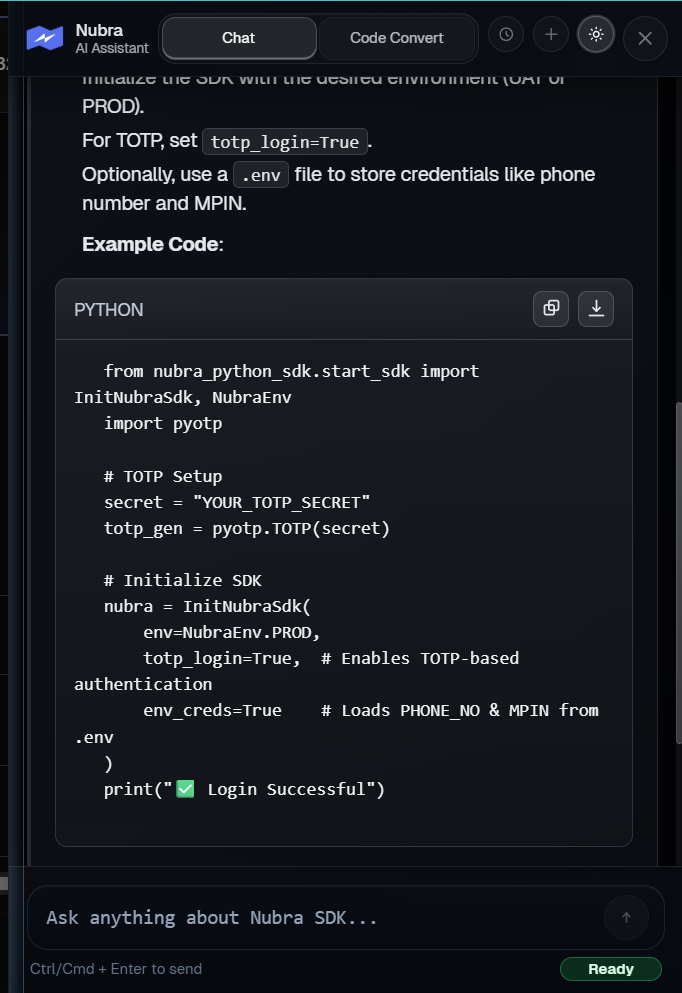
That makes it useful not just for discovery, but for actual implementation work.
If you are new to Nubra, Chat mode behaves like an interactive layer on top of docs and SDK workflows.
If you already know the system, it becomes a speed tool.
What Code Convert Mode Is Good For#
Use Code Convert when you already have code written around another broker or another structure and want to move it closer to Nubra.
Typical examples:
- converting order placement snippets
- adapting authentication flows
- translating data-access logic
- reworking helper functions into Nubra SDK patterns
Instead of manually reading each line and remapping it yourself, you can paste the source logic and use the extension as a first-pass translator.
That does not replace engineering judgment, but it removes a lot of repetitive work.
For example, if another broker snippet looks like this:
broker.place_order(
    symbol="NIFTY",
    side="BUY",
    qty=50,
    order_type="MARKET"
)
you can use Code Convert to quickly reshape it into a Nubra-oriented starting point, then refine the final details from there.
A Very Real Use Case#
Imagine you are reading a strategy snippet from another broker ecosystem and you want to understand how the same thing would look in Nubra.
You can ask in Chat:
How can we authenticate in Nubra using TOTP and environment credentials?Or you can move into Code Convert and paste the original snippet directly.
From there, the extension can give you:
- a Nubra-oriented code response
- a clearer explanation of what changed
- a faster path to testing
This is especially useful when the blocking issue is not strategy logic, but the setup around it.
That is the real value here:
- Chat helps you understand
- Code Convert helps you translate
- together they shorten the path from idea to working code
Why This Is Useful in Practice#
Most trading developers lose time in the same places:
- figuring out auth flows
- remembering SDK method patterns
- converting examples from one ecosystem into another
- going back and forth between docs, code, and trial-and-error
The extension reduces that loop.
Instead of:
- reading docs
- searching old code
- rewriting syntax manually
- testing and debugging
you get a faster first draft directly in the browser, where you are already reading docs, examples, and broker code.
Best-Fit Users#
This extension is especially useful for:
- traders learning the Nubra SDK
- developers migrating from another broker stack
- teams building strategy tooling around Nubra
- users who want quick implementation help without leaving the browser
Where It Fits in APIverse#
The Chrome extension is one of the fastest entry points into the Nubra ecosystem because it sits next to your workflow instead of forcing you into a separate environment.
It works well alongside:
- Nubra docs
- Python libraries in APIverse
- integration guides
- execution and market-data workflows
Final Take#
The best part of the extension is not just that it answers questions.
It shortens the distance between:
- seeing an idea
- understanding the implementation
- and getting to working Nubra code
If your workflow involves frequent context-switching between docs, APIs, and code examples, the Nubra Chrome extension is one of the cleanest ways to move faster around Nubra.