
Download the Excel Plugin First#
If you want to explore the project immediately, open the repository here:
https://github.com/socials-zanskar/nubra-excel-plugin/tree/main
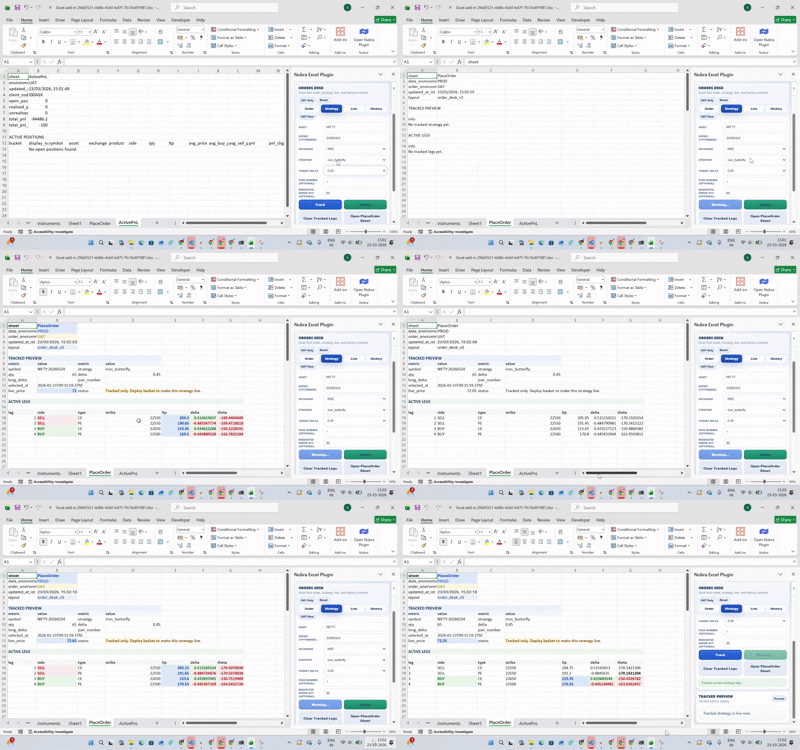
The Nubra Excel Plugin is built for traders and operations teams who still want Excel as the working surface, but do not want to lose access to live market feeds, order functions, or broker-side workflows.
Instead of forcing a Python setup, the plugin turns Microsoft Excel into a Nubra-connected workspace for:
- authentication
- live market data
- historical candle pulls
- positions and account views
- order placement
- strategy-side monitoring
If your desk still runs on spreadsheets, this is the fastest way to bring Nubra into that workflow.
How to Download and Run the Plugin#
The fastest installation path is through the project repository:
https://github.com/socials-zanskar/nubra-excel-plugin/tree/main
If you only want to get started quickly:
- Open the repository.
- Download the project as a ZIP file.
- Extract it locally.
- Locate the packaged
.exelauncher included with the project. - Run the executable.
The launcher is designed to bootstrap the plugin flow and open the Excel-side experience without asking you to manually wire the add-in by hand.
For desk users, that is the practical path:
- download the repo
- extract the package
- run the executable
- open Excel with the plugin workflow ready
This keeps setup friction low, especially for spreadsheet-first users who do not want to manage a separate local development environment just to test the workflow.
What the Excel Plugin Actually Solves#
A lot of trading teams do not begin inside a custom terminal.
They begin in:
- shared Excel sheets
- reporting templates
- desk-side trackers
- semi-automated strategy sheets
The problem is that most broker integrations stop at raw APIs. That forces teams to build their own glue layer between Excel and live execution.
The Nubra Excel Plugin removes that gap by packaging the most common trading actions into a familiar spreadsheet-native environment.
Core Capabilities#
Based on the current plugin README and workflow structure, the Excel Plugin supports:
1. Nubra Login From Excel#
The add-in uses Nubra's OTP and MPIN authentication flow directly from the Excel task pane. At the API level, the plugin works through the authentication sequence built around:
sendphoneotpverifyphoneotpverifypin
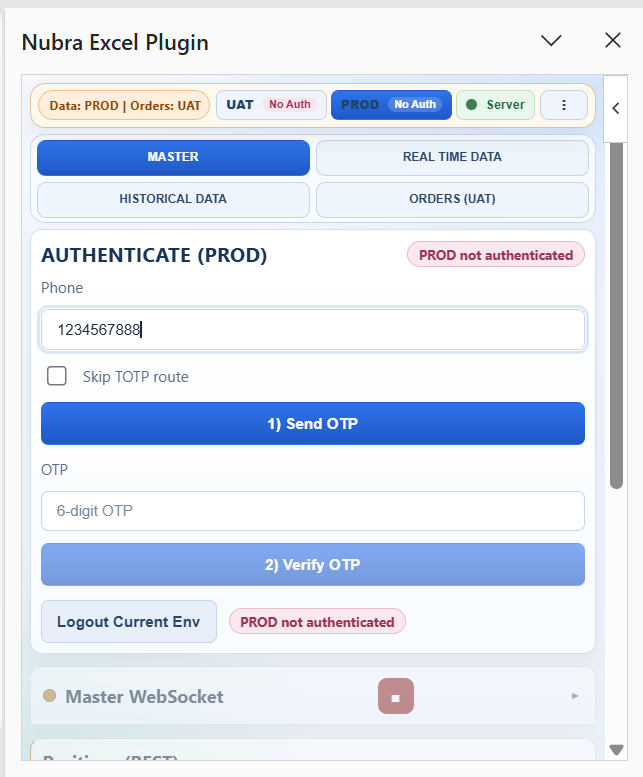
This means:
- no external login flow is required for every action
- authentication stays tied to the Nubra account
- Excel becomes an authenticated control surface
From an environment perspective, the plugin is built to work across both Nubra endpoints and workflow modes:
- live WebSocket connectivity is configured against Nubra WebSocket upstream targets
- the current build also includes UAT trading work, including order placement, basket deploy, and square-off monitoring flows
Operationally, that means teams should think in terms of environment-aware authentication:
PROD / LIVEcontext for live market streaming and production-side market data behaviorUATcontext for testing-oriented order and basket workflows now present in the plugin build
That split is also reflected elsewhere in the repo. For example, the historical module notes that the 1s interval is allowed only in LIVE/PROD, while the build highlights explicitly call out current UAT trading flows.
2. Instrument and Reference-Data Sync#
The plugin includes a flow for syncing reference data and instruments needed by the workbook.
That helps when users want to:
- pull the right contracts into sheets
- keep instrument identifiers available for formulas and actions
- reduce manual copy-paste across trading symbols
3. Live WebSocket Feeds#
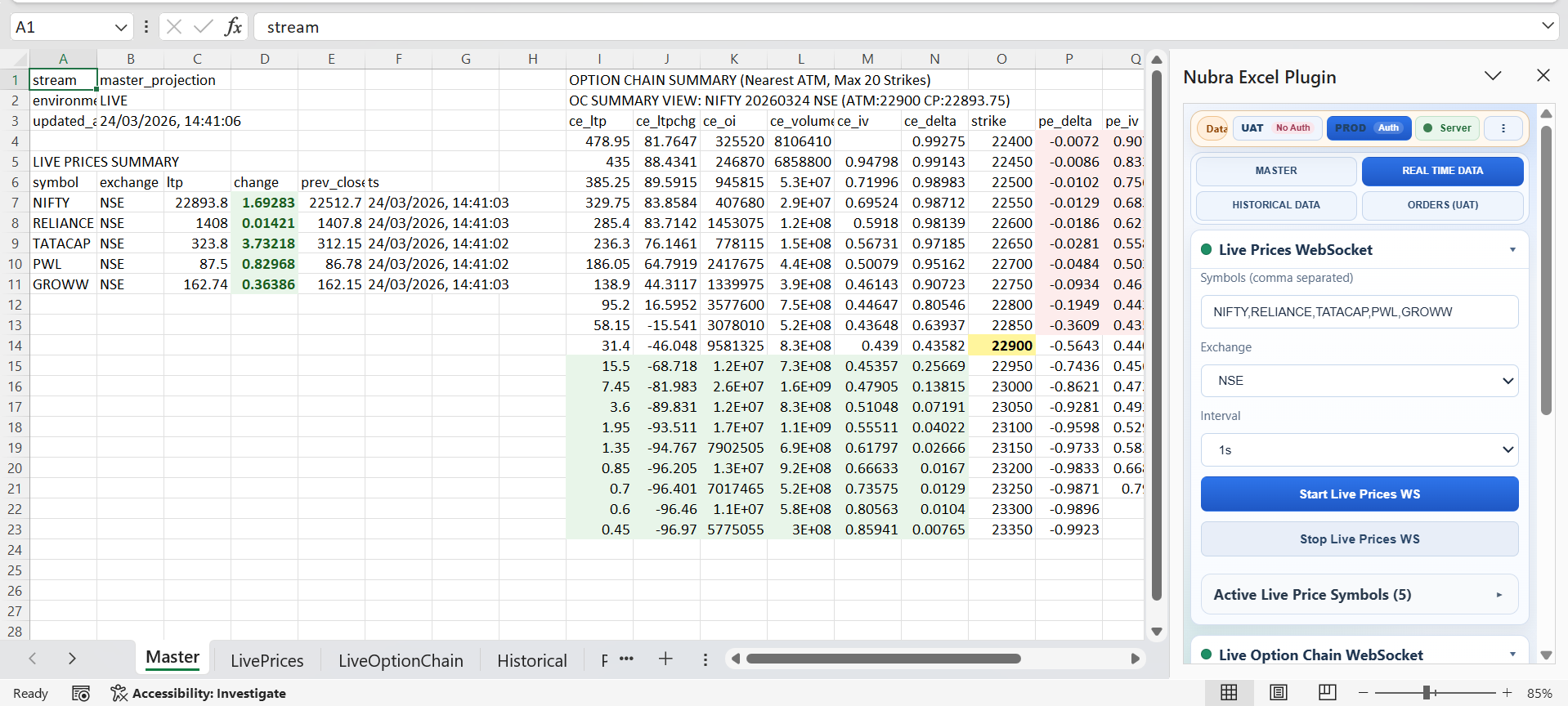
The plugin is designed to work with live WebSocket data streams, which makes it useful for:
- watchlists
- price boards
- live monitoring sheets
- strategy dashboards on the desk
Instead of treating Excel as a static reporting tool, the plugin makes it usable for live market tracking.
The repository also documents two Nubra WebSocket upstream targets:
wss://api.nubra.io/apibatch/wswss://uatapi.nubra.io/apibatch/ws
That is useful context when you are validating whether a workbook is behaving against a live environment or a UAT path.
4. REST Positions and Account Views#
The README also points to positions via REST.
That matters because many teams use Excel to review:
- current exposure
- strategy positions
- account state
- post-trade summaries
The plugin lets those views stay inside a familiar workbook structure.
5. Historical Candle Pulls and Chart Output#
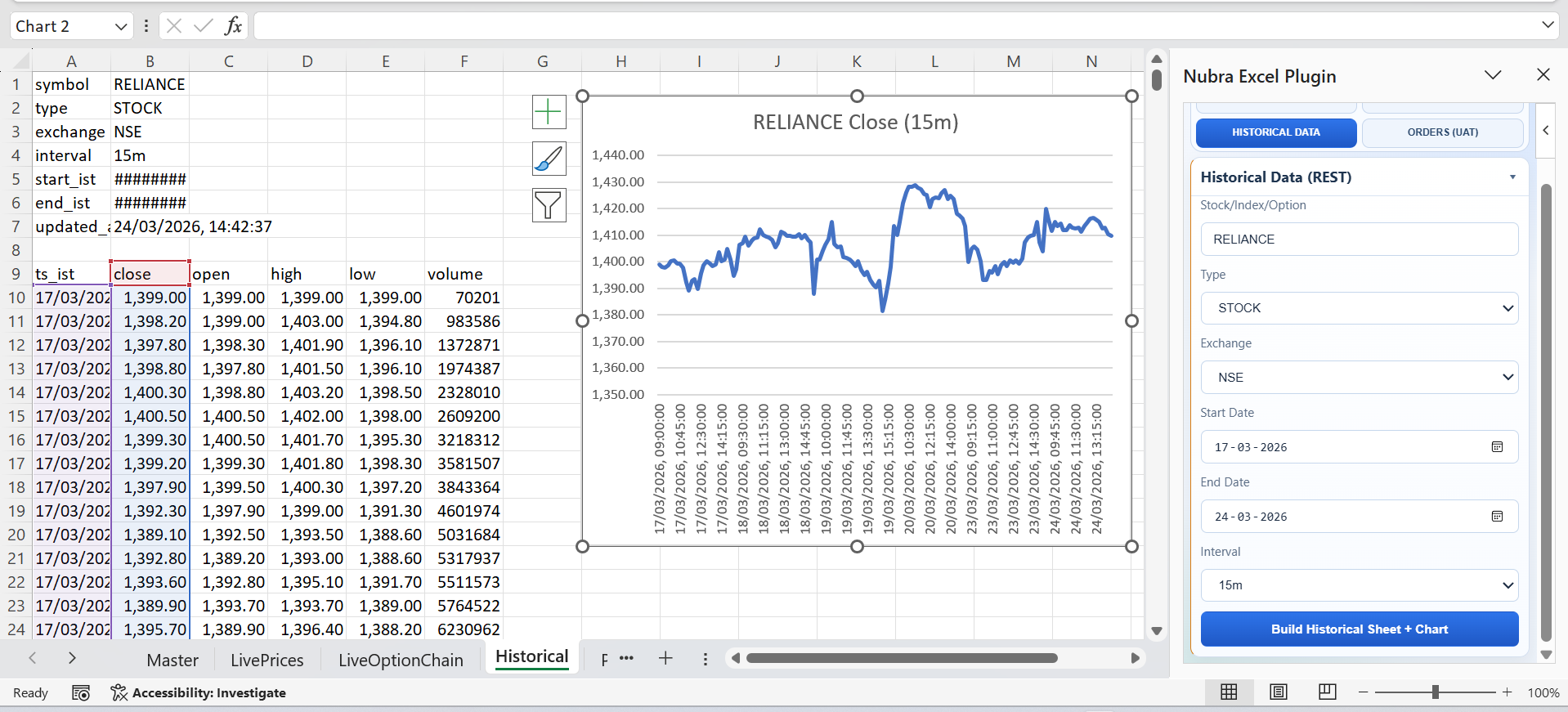
Historical candles are also part of the workflow.
This is useful for:
- quick research inside Excel
- building charts from historical market data
- validating setups before sending trades
It is a strong fit for teams that want to stay spreadsheet-first without giving up structured market data access.
6. Order Placement From the Task Pane#
The plugin is not only for read-only workflows.
It also supports order placement from the Excel task pane, which makes it more operational than a basic data connector.
This can be useful for:
- semi-automated desk workflows
- assisted execution
- strategy-side dispatch from prepared sheets
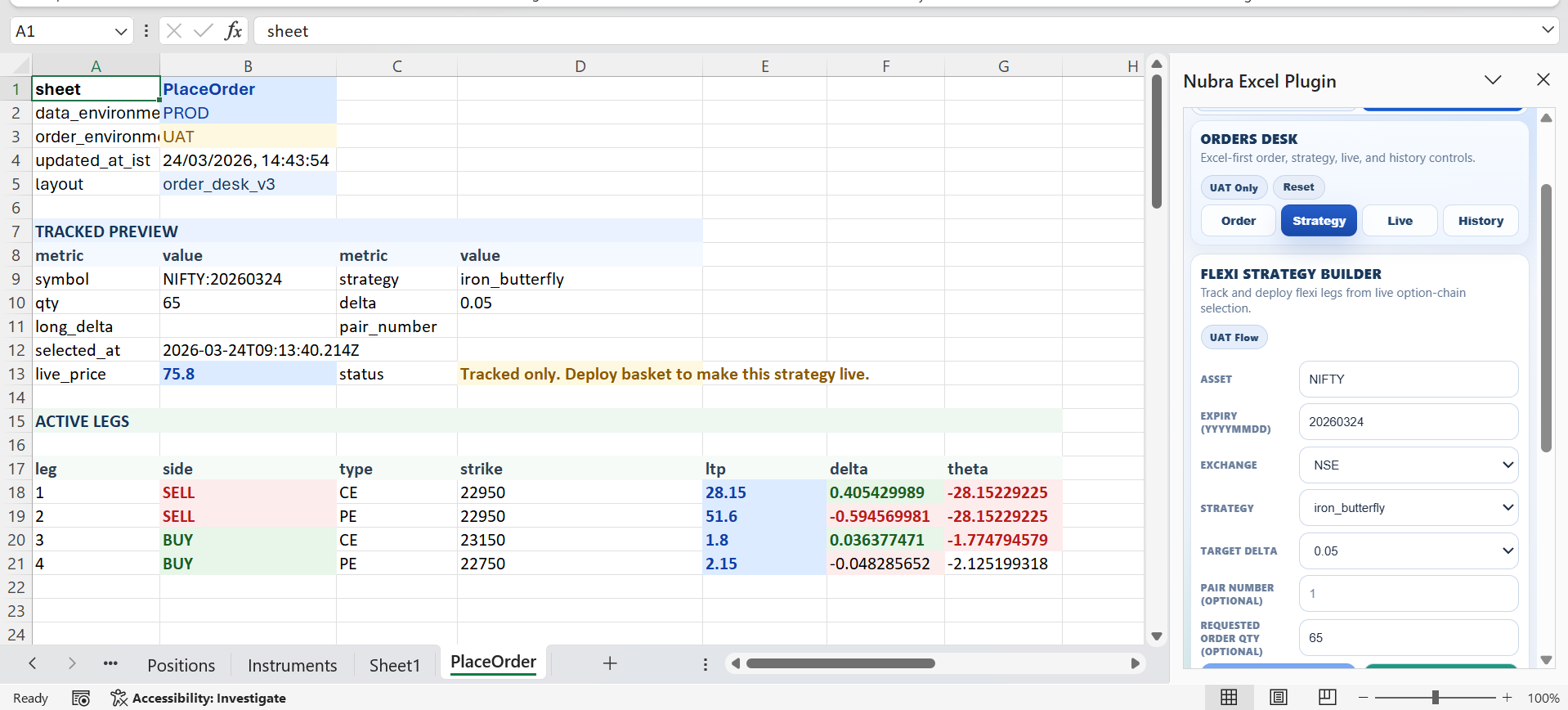
7. Strategy Preview, Basket Deploy, and Square-Off Monitoring#
The plugin README also references strategy-side workflows such as:
- order strategy preview and tracking
- UAT basket deployment
- square-off monitoring
That means the add-in is designed not just for raw data access, but for execution-aware spreadsheet workflows.
Why This Matters for Real Desks#
Not every trading team wants to rebuild its workflow inside a full custom platform.
Many teams already operate through:
- reconciled Excel templates
- analyst-maintained sheets
- manual review layers
- semi-automated trade preparation
The Nubra Excel Plugin lets those teams keep the operational convenience of Excel while still connecting to Nubra's trading infrastructure.
That makes it useful for:
- traders who prefer spreadsheets
- execution desks that work from shared templates
- teams moving gradually from manual to semi-automated workflows
No Python Setup Required#
One of the most practical details in the README is that the plugin is structured as a Node.js-based Office Add-in, not a Python utility.
For many users, that lowers friction significantly:
- no Python environment management
- no local SDK setup just to test a workbook flow
- easier onboarding for spreadsheet-native users
This is one of the reasons the plugin fits well inside APIverse. It makes Nubra accessible from a completely different surface than the Python libraries.
Where the Excel Plugin Fits in APIverse#
Explore APIverse here: https://nubra.in/products/api/apiverse
APIverse is not just a package directory. It is meant to bring together the different ways people actually work with Nubra:
- Python libraries for developers
- browser tools for code conversion and assistance
- platform integrations for deployment
- spreadsheet plugins for desk-side workflows
The Excel Plugin is the spreadsheet-native branch of that ecosystem.
It is especially useful for teams that want Nubra inside their daily operating surface without building custom UI first.
When to Use It#
The Excel Plugin is a good fit if your team wants to:
- log in to Nubra from Excel
- watch live prices in a workbook
- pull candles and positions into sheets
- review orders in a structured desk format
- keep strategy-side workflows close to existing spreadsheet processes
If that is how your desk already works, this plugin can be one of the fastest adoption paths into Nubra.
Final Take#
The Nubra Excel Plugin gives spreadsheet-native teams a practical way to connect Excel with live Nubra workflows.
Instead of replacing Excel, it extends it with:
- authentication
- data sync
- live feeds
- candle access
- position views
- order actions
For many teams, that is exactly the right bridge between familiar desk operations and modern API-backed execution.